
Beat the Anime Boss Controls
WASD, jump, camera, then the only bind that pays: E RECRUIT! Shop unlocks after the tutorial.
Beat the Anime Boss uses ordinary Roblox movement and one tycoon-specific prompt. This page is the bind list. The published loop — bosses, recruits, upgrades, Summoner, mutations, leaderboard, offline cash — lives on how to play. If you have not spawned yet, start on Getting Started and come back when the HUD is on screen.
Fun and Giggles Games has not posted a custom keymap. We will not invent sprint toggles, auto-raid hotkeys, or secret number-row macros. If a video overlay shows a 20-bind fighter pad, that creator is playing a different title. Place ID 129216769649527 is a simulation tycoon on 8-player servers. You walk, you look, you press E, you tap Shop after the tutorial.
PC: WASD, jump, camera
On keyboard and mouse the defaults are the Roblox defaults:
- W A S D move the avatar. Forward, left, back, right. There is no published sidestep combat layer on top of that.
- Jump is the space bar on PC. Use it to clear low props and to stop standing inside a recruit billboard you cannot see.
- Camera is the mouse. Hold the right mouse button (or use the default Roblox camera follow) until you can actually read the prompt in front of you. A boss drop you cannot frame is a boss drop you will walk past.
That is the movement sentence. The tycoon does not ask you to learn a 12-hit string. If the camera is inside a wall, rotate until the plot and the nearest prompt are both in view. If WASD feels inverted, you changed a Roblox camera setting outside this experience; reset that in the Roblox menu, not in a Beat the Anime Boss settings screen that does not exist in the listing.
Do not hunt a published “interact” key besides E. Upgrade menus, Summoner rolls, and the leaderboard sit in on-screen UI. Click or tap those buttons. Binding a keyboard shortcut you saw on Fight Anime Bosses will not open Trait Crystals here, because this place does not have them.
The bind that matters: E RECRUIT!
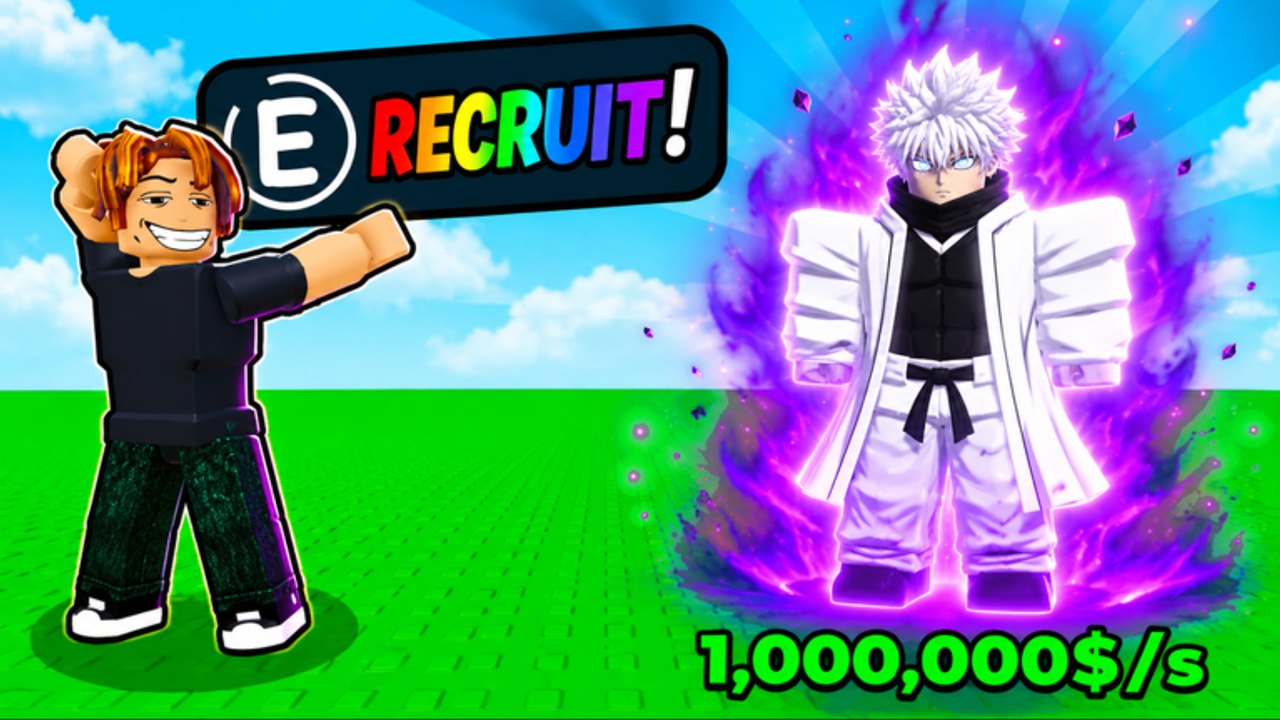
Promo art prints E RECRUIT! in rainbow letters next to a Limitless-style white-hair sorcerer and a 1,000,000$/s fantasy ticker. Walk into that prompt and press E. If nothing happens, you are looking at a model, not a prompt. Strafe, jump, and rotate the camera until the billboard appears, then press the key again.
A weak unit that exists beats a perfect unit you never picked up. The full recruit pipeline — boss drops, Summoner rolls, mutations, and why you still buy upgrades first — is how to get units. This controls page only cares that you can actually fire the prompt.
If you are standing on a defeated boss and the HUD is quiet, you missed the interact volume. Circle the body. The prompt is a billboard, not a proximity voice line. Other players on the 8-player server can stand on the same floor without blocking your key; they cannot press E for your plot.
Shop and the codes box after the tutorial
The Shop / codes field usually stays hidden until spawn prompts are done. That is why a brand-new account can swear the box is missing. Finish the tutorial, recruit once with E, then open Shop from the side menu (left on most PC layouts; a bag or store icon on mobile). Scroll past gamepasses until you see a codes field.
The click path, case-sensitivity, like-and-group checks, and the empty official list as of September 2026 are on how to redeem codes. This page only needs the control fact: the box is a post-tutorial Shop widget, not a chat command and not a keyboard cheat. Typing a string into the Roblox chat window will not redeem it.
If Shop is still missing after a full spawn, leave and rejoin a fresh 8-player server. Accounts that hop from a friend’s instance mid-tutorial can miss the HUD for an entire session. Do not invent a second Shop hotkey while you wait.
Mobile tap
Touch uses the on-screen joystick and jump button. The recruit bind becomes an on-screen button instead of a keyboard E. Tap it. Do not wait for a physical key that a phone does not have.
Mobile pitfalls that look like “broken controls”:
- The thumb cluster covers the prompt. Nudge the joystick, then tap recruit the moment the billboard is readable.
- The on-screen keyboard capitalizes the first letter in the codes box and breaks a case-sensitive string. Paste. Do not type.
- Pinch-zoom is a camera convenience, not a combat zoom. If you cannot see E RECRUIT!, rotate, do not pinch until the HUD vanishes.
Console uses the left stick for movement. Jump is the platform jump button. Interact still maps to the prompt; if a codes field exists, complete like-and-group checks on the Roblox app first, because the in-experience box cannot join Fun and Giggles Games for you.
PC, mobile, and console share the account. The farm travels. Do not rebuild from zero because you switched from phone to keyboard. Park the plot with the same logout rules on every device; the bind that changes is the input, not the tycoon.
8-player servers are the social layer
Servers hold eight players. Other plots are real people. You will see other recruits, other cameras spinning around the same boss drop, and other people racing a raid window when the live title still prefixes RAIDS. That is the product. It is not split-screen co-op and it is not a single-player clicker with mannequins.
Social rules that are actually control rules:
- Do not stand inside someone else’s prompt and assume you stole it. Your E recruits for your plot.
- Do not AFK on the spawn pad hoping the winged raid boss dies without input. Presence is the raid mechanic; see raids.
- Voice chat is not required. The listing does not even sell it as a feature. Camera and movement are enough.
- A full lobby is not a reason to skip Shop. Eight players can all open Shop after their own tutorials.
If the instance feels dead, you loaded an emptying server, not a private match. Rejoin from the live place. Leaderboard climbing still happens on those eight slots; the bind page is how you move, the leaderboard guide is how the scoreboard actually works.
HUD buttons that are not keyboard binds
Once the tutorial is over, treat the rest of the client as buttons:
- Upgrade lives in the unit / plot UI. Feed $/s there. The upgrade planner is the spend order, not a hotkey.
- Summoner is a menu. Level it after the farm prints. The Summoner guide is when to click it, not which key opens it.
- Leaderboard is a panel. Open it to look. Closing it does not pause offline income.
- Events on the Roblox page (Admin Abuse, raids prefix) are not in-experience keybinds. You join them by being in the server. Prep on Admin Abuse.
Scripts that claim auto-walk, auto-E, or auto-raid will show up in search. As of September 2026 there were no dedicated Beat the Anime Boss dumps under this name. A banned account cannot press E. The scripts hub exists because the search exists.
A controls session you can repeat
- Spawn. Confirm you can WASD (or joystick) and that the camera can see the plot.
- Find E RECRUIT! and take the unit. On mobile, tap the on-screen recruit control.
- Finish the tutorial so Shop exists. Bookmark how to redeem codes even while the official description lists none.
- Click upgrades in the HUD. Do not hunt a hidden level-up key.
- Glance at other players only to remember you are on an 8-player server, then go back to your prompt.
- Before you quit, park a living farm. Binds do not earn overnight. Units do — offline earnings.
Controls in Beat the Anime Boss are deliberately small. Walk, look, jump, press E, tap Shop after the tutorial, and share an 8-player floor without treating it like a fighting-game pad. If a guide asks you to bind a secret raid macro, close it. If the prompt is on screen and you can hit it, you already have every control this tycoon published.
Frequently Asked Questions
Quick answers for Beat the Anime Boss on Roblox.
What are the PC controls in Beat the Anime Boss?
WASD to move, jump, and a mouse camera. The tycoon bind is **E** on the **E RECRUIT!** prompt. Upgrade, Summoner, and leaderboard live in on-screen UI, not extra unpublished hotkeys.
How do I recruit on mobile?
Use the on-screen joystick and jump, then tap the recruit button when the prompt is visible. There is no physical **E** key on a phone. Details on how to get units.
Where is the codes box?
In Shop after you finish the tutorial. It is not a chat command. Follow how to redeem codes for paste, case sensitivity, and like-and-group checks.
Are there secret combat hotkeys?
None are published. Fun and Giggles Games has not posted a custom keymap. Ignore fighter-pad overlays copied from other anime games.
Do I need voice chat on 8-player servers?
No. Servers hold eight players and that is the social layer. Movement, camera, and the recruit prompt are enough. Raid presence is covered in raids.
Should I reread this or how to play?
Use this page for binds. Use how to play for the loop order and Getting Started for the first hour.